
Background Eraser Free2.0 - App Store
You'll be able to see results in few seconds.
Publisher Description
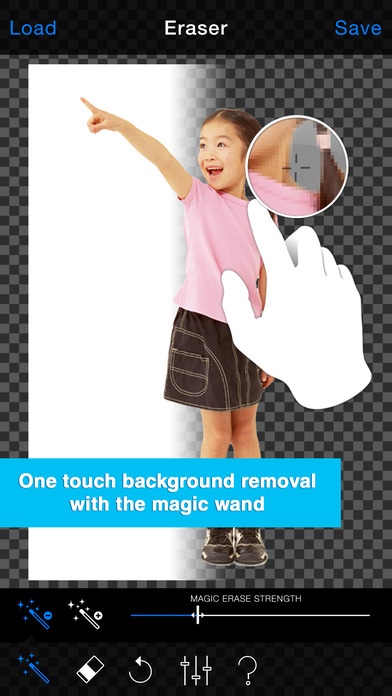
The app stores No1 eraser tool just got better!
Background Eraser Free. Quickly remove the background and save images with a transparent background.
Eraser Free is a best in class app that was created to overcome existing usability barriers in other apps and let users concentrate on creating great images. It's fast and light build will never slow your workflow down.
New
App full re-written
All tools unlocked
iPhone 6 / 6+ optimized
iPad support improved
Full screen ads removed
Features
Magic wand tool. Automatically subtract and add areas of background. The unique pop-up zoom window lets you accurately target areas of background to remove.
Eraser (brush) tool. Resizable soft and hard brushes with free zooming and rotation mean you can get into every nook and cranny of your image for a very high quality cut-out.
Edge blur. Feather the edges of your cut out image for better looking hair, fur or background blurs and much more.
Fast and light. Everything you need, nothing you don't. This app is focused on doing one thing, very well!
Import photos of nearly any size, export up to 8MP
Save small and large transparent images (24bit PNGs) Save cut-outs on black or white. (JPGs)
Free
The free version of eraser is supported by advertising and a slightly restricted feature set. But don't worry, if you like the app you can remove the add and limitations at any time!
Background eraser lets you save transparent images to your phones gallery. It is a great companion app to document producing apps, office apps and popular photo montage and collage apps such as Papelook, Collage Creator, PicMix and many more.
The eraser is compatible with iPhone 5 or greater and iPad 2 and greater.
Requires iOS 7.1 or later. Compatible with iPhone, iPad, and iPod touch.
About Background Eraser Free
The company that develops Background Eraser Free is Anthony Glover. The latest version released by its developer is 2.0.
To install Background Eraser Free on your iOS device, just click the green Continue To App button above to start the installation process. The app is listed on our website since 2013-10-22 and was downloaded 0 times. We have already checked if the download link is safe, however for your own protection we recommend that you scan the downloaded app with your antivirus. Your antivirus may detect the Background Eraser Free as malware if the download link is broken.
How to install Background Eraser Free on your iOS device:
- Click on the Continue To App button on our website. This will redirect you to the App Store.
- Once the Background Eraser Free is shown in the iTunes listing of your iOS device, you can start its download and installation. Tap on the GET button to the right of the app to start downloading it.
- If you are not logged-in the iOS appstore app, you'll be prompted for your your Apple ID and/or password.
- After Background Eraser Free is downloaded, you'll see an INSTALL button to the right. Tap on it to start the actual installation of the iOS app.
- Once installation is finished you can tap on the OPEN button to start it. Its icon will also be added to your device home screen.
Program Details
System requirements
Download information
Pricing
Version History
version 2.0
posted on 2013-10-22
Disclaimer
Official App Store Link
We do not host Background Eraser Free on our servers. We did not scan it for viruses, adware, spyware or other type of malware. This app is hosted by Apple and passed their terms and conditions to be listed there. We recommend caution when installing it.
The App Store link for Background Eraser Free is provided to you by apps112.com without any warranties, representations or guarantees of any kind, so access it at your own risk.
If you have questions regarding this particular app contact the publisher directly. For questions about the functionalities of apps112.com contact us.
